Consolidating to Cilium: Replacing kube-proxy, MetalLB, and ingress-nginx in Three Phases
In March 2026, ingress-nginx reached end-of-life. For clusters already running Cilium as their CNI, this is the right moment to go all-in: replace kube-proxy, MetalLB, and ingress-nginx with Cilium's built-in equivalents — ending up with a single networking component doing the work of four.


The starting point
Before the migration, the cluster's networking stack looked like this:
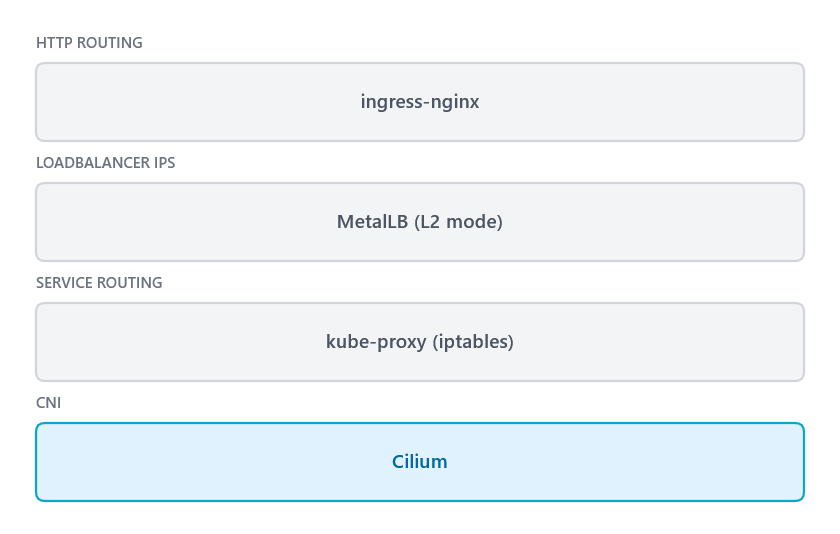
Cilium was already the CNI. kube-proxy was still running alongside it for Service routing. MetalLB handled LoadBalancer-type Services in L2 mode. ingress-nginx sat on top, holding the single public IP and routing all inbound HTTP/HTTPS traffic.
Supporting cast: cert-manager with an ACME HTTP01 ClusterIssuer (targeting ingressClassName: nginx), and external-dns reading hostnames from Ingress resources.
The migration happens in three sequential phases. Each phase is independently justified — you don't need to commit to all three up front — but they build on each other.
Phase 0: Replacing kube-proxy with Cilium's eBPF datapath
Why
Cilium's eBPF datapath can handle all Service routing natively, making kube-proxy's iptables rules redundant. More importantly, Cilium's L2 announcement feature (Phase 1) requires kube-proxy replacement mode — so this phase is a hard prerequisite for the next one.
How
Update the Cilium Helm values to enable full kube-proxy replacement:
# cilium/values.yaml
cilium:
  kubeProxyReplacement: true
  k8sServiceHost: YOUR_NODE_IP   # needed so Cilium can reach the API server without kube-proxy
  k8sServicePort: 6443
After Cilium rolls out, verify that it has taken over Service routing:
kubectl exec -n kube-system ds/cilium -- cilium status | grep KubeProxy
KubeProxyReplacement: True   [eth0 1.2.3.4 ...]
Once that's confirmed, remove the kube-proxy DaemonSet:
kubectl -n kube-system delete daemonset kube-proxy
kubectl -n kube-system delete configmap kube-proxy
Things to watch out for
This step replaces the routing rules for every Kubernetes Service simultaneously — ClusterIP, NodePort, and LoadBalancer. If something goes wrong, DNS breaks (CoreDNS is behind a ClusterIP Service), inter-pod communication breaks, and your ingress controller stops routing traffic. SSH to the node itself is unaffected, since it uses the host kernel network stack directly and has nothing to do with the CNI or kube-proxy. The exception is if you are using Cilium's HostFirewall feature, which applies Cilium network policies to host-level traffic — in that case SSH can be affected.
Validate thoroughly before moving on: ClusterIP routing, NodePort, DNS resolution, and any health checks your load balancer or hosting provider uses should all continue working after this step.
Phase 1: Replacing MetalLB with Cilium LB-IPAM and L2 announcements
Why
After Phase 0, MetalLB's only remaining job is answering ARP requests for your LoadBalancer IPs. Cilium can do this natively with CiliumLoadBalancerIPPool and CiliumL2AnnouncementPolicy, removing MetalLB as a dependency entirely.
How
First, create the IP pool mirroring your existing MetalLB address pool:
apiVersion: cilium.io/v2alpha1
kind: CiliumLoadBalancerIPPool
metadata:
  name: default
spec:
  blocks:
    - cidr: "1.2.3.4/32"   # your public IP
Then create an announcement policy so Cilium responds to ARP for those addresses:
apiVersion: cilium.io/v2alpha1
kind: CiliumL2AnnouncementPolicy
metadata:
  name: default
spec:
  interfaces:
    - eth0   # your public-facing interface
  loadBalancerIPs: true
To pin a Service to the exact same IP it had under MetalLB, use the lbipam.cilium.io/ips annotation:
# On your existing LoadBalancer Service (e.g. ingress-nginx)
metadata:
  annotations:
lbipam.cilium.io/ips: "1.2.3.4"Once all Services have been moved to Cilium's pool, remove MetalLB:
helm uninstall metallb -n metallb-systemBGP instead of L2
Both MetalLB and Cilium support BGP as an alternative to L2/ARP announcements. If your environment has a BGP-capable router or upstream switch, the migration works the same way: replace MetalLB's BGPPeer and BGPAdvertisement resources with Cilium's CiliumBGPPeeringPolicy (or the newer CiliumBGPClusterConfig in Cilium 1.16+). The IP pool and annotation-based IP pinning are identical between the two modes — only the announcement mechanism differs. BGP is the better choice in bare-metal datacenter or homelab setups with a router you control; L2 mode is simpler when you just need ARP on a flat LAN or a VPS with a single IP.
Things to watch out for
The IP annotation key has changed between Cilium versions in various blog posts you'll find online. Always verify the correct annotation against the Cilium docs for your installed version — don't copy it blindly from a tutorial.
Phase 2: Replacing ingress-nginx with Cilium Gateway API
This is the largest phase. Gateway API is the Kubernetes project's successor to the Ingress API — more expressive, namespace-scoped, and implemented natively by Cilium since version 1.16. The migration involves updating three supporting components (cert-manager, external-dns, ArgoCD or your GitOps tool), installing the CRDs, creating a Gateway, and converting each Ingress to an HTTPRoute.
Prerequisites
1. Gateway API CRDs
The Cilium docs reference Gateway API version 1.5.1 as the supported version at the time of writing. Rather than applying the upstream YAML directly, you can install the CRDs via my gateway-api-crds Helm chart, which wraps both the standard and experimental channel manifests in a proper Helm release:
helm repo add christianhuth https://charts.christianhuth.de
helm install gateway-api-crds christianhuth/gateway-api-crds
The chart's appVersion field reflects the upstream Gateway API version it ships. Use helm search repo christianhuth/gateway-api-crds --versions to find the chart version whose appVersion matches the version your Cilium release supports, and pin it explicitly:
helm install gateway-api-crds christianhuth/gateway-api-crds \
  --version <chart-version>   # pick the version where appVersion = v1.5.1
By default the chart installs the standard channel CRDs. If you need the experimental channel — which adds additional resource kinds such as TCPRoute, UDPRoute, and XBackendTrafficPolicy — switch channels via values:
standard:
  enabled: false
experimental:
  enabled: true
If you only need a subset of the CRDs, individual ones can be disabled under standard.crds (or experimental.crds):
standard:
  crds:
    tlsroutes: false     # disable CRDs you don't need
    grpcroutes: false
2. Enable Gateway API in Cilium
cilium:
  gatewayAPI:
    enabled: true
    secretsNamespace:
      create: false
      name: kube-system   # namespace for Cilium's internal mTLS secrets (agent↔envoy xDS channel)
3. Update cert-manager
cert-manager's Gateway API support needs to be explicitly enabled:
cert-manager:
  config:
    enableGatewayAPI: true
You also need to update your ClusterIssuer. If you've been using HTTP01 challenges with ingressClassName: nginx, you have two options:
- Switch to HTTP01 via Gateway API — replace the
ingresssolver with agatewayHTTPRoutesolver block pointing at your new Gateway. - Switch to DNS01 — if your DNS provider has an API (Cloudflare, Route53, etc.), DNS01 challenges work without any dependency on the Gateway or Ingress being reachable. This is the more robust option, especially if you want to issue certificates before the new Gateway is serving traffic.
# DNS01 solver with Cloudflare
spec:
  acme:
    solvers:
      - dns01:
          cloudflare:
            apiTokenSecretRef:
              name: cloudflare-api-token
              key: cloudflare_api_token
4. Update external-dns
Add gateway-httproute as a source alongside the existing ingress source (keep both during the migration so DNS records are maintained for both old and new resources):
args:
  - --source=service
  - --source=ingress
  - --source=gateway-httproute   # add this
Also add RBAC for the new resource types:
rules:
  - apiGroups: ["gateway.networking.k8s.io"]
    resources: ["gateways", "httproutes"]
    verbs: ["get", "list", "watch"]
Creating the Gateway
The Gateway is the equivalent of your ingress controller's entry point. Create it in a dedicated namespace:
apiVersion: gateway.networking.k8s.io/v1
kind: Gateway
metadata:
  name: gateway
  namespace: gateway
  annotations:
    lbipam.cilium.io/ips: "1.2.3.4"   # pin to your public IP
spec:
  gatewayClassName: cilium
  listeners:
    - name: http
      protocol: HTTP
      port: 80
      allowedRoutes:
        namespaces:
          from: All
    - name: https
      protocol: HTTPS
      port: 443
      tls:
        mode: Terminate
        certificateRefs:
          - name: gateway-tls   # one combined cert — see note below
      allowedRoutes:
        namespaces:
          from: All
For Gateway TLS termination, the referenced secrets simply need to exist in the same namespace as the Gateway resource. Cilium's operator reads them from there directly — no additional sync step required.
Migrating Ingresses to HTTPRoutes
Before converting each Ingress, check whether the upstream Helm chart has native HTTPRoute support. Many charts from the prometheus-community, grafana, and other popular repositories now include a route.main values block that renders an HTTPRoute directly. Using this is always preferable to a custom template alongside the chart.
A typical native chart configuration looks like:
# In your chart's values.yaml
route:
  main:
    enabled: true
    annotations:
      link.argocd.argoproj.io/external-link: https://grafana.example.com
    hostnames:
      - grafana.example.com
    parentRefs:
      - name: gateway
        namespace: gateway
        sectionName: https
For charts with no built-in support, a custom template is straightforward:
# templates/httproute.yaml
apiVersion: gateway.networking.k8s.io/v1
kind: HTTPRoute
metadata:
  name: my-app
spec:
  hostnames:
    - my-app.example.com
  parentRefs:
    - name: gateway
      namespace: gateway
      sectionName: https
  rules:
    - backendRefs:
        - name: my-app
          port: 8080
HTTP→HTTPS redirects: a common pattern with ingress-nginx was a dedicated redirect Ingress using the permanent-redirect annotation. The Gateway API equivalent uses an HTTPRoute on the http listener with a RequestRedirect filter. A single route can cover all your domains:
apiVersion: gateway.networking.k8s.io/v1
kind: HTTPRoute
metadata:
  name: http-to-https-redirect
spec:
  parentRefs:
    - name: gateway
      namespace: gateway
      sectionName: http   # attach to the HTTP listener only
  hostnames:
    - "*.example.com"
    - example.com
  rules:
    - filters:
        - type: RequestRedirect
          requestRedirect:
            scheme: https
            statusCode: 301
Omitting path from the redirect filter preserves the original path and query string — the clean equivalent of permanent-redirect: https://example.com$request_uri.
Cross-namespace routing: HTTPRoutes in application namespaces attach to a Gateway in a different namespace by default — this works out of the box when the Gateway's allowedRoutes.namespaces.from is set to All. No ReferenceGrant is needed in this direction.
The cutover
If you only have a single public IP (as is typical with most VPS providers), you cannot run ingress-nginx and the new Cilium Gateway simultaneously on the same IP and ports. There will be a brief period of downtime.
The safest sequence:
- Pre-validate all HTTPRoutes while ingress-nginx is still running. Test each application via
curl --resolve hostname:443:IP /pathorkubectl port-forwardagainst the Gateway Service, before it holds the public IP. - Ensure all TLS certificates are already issued. With DNS01, you can issue certs without the Gateway being externally reachable. Don't start the cutover until every cert is Ready.
- Remove ingress-nginx (or scale it to zero). The public IP is released back to Cilium's pool.
- Verify the Gateway picks up the IP and the
Programmed: Truecondition appears on the Gateway resource. - Test from outside the cluster.
⚠ Downtime window Steps 3–4 involve a gap between ingress-nginx releasing the IP and the Gateway Service being re-announced via ARP. In practice this is a matter of seconds, but it is real downtime. Schedule during low-traffic hours.
Common issues
Multiple TLS certificates → xDS deadlock
This is the most serious issue you may encounter. The Gateway API spec allows multiple certificateRefs on a single HTTPS listener — a natural choice if you serve domains from different certificates:
tls:
  certificateRefs:
    - name: example-com-tls
    - name: myorg-io-tls   # ← do not do this
Cilium's operator generates one Envoy filter chain per certificate, but doesn't add SNI matchers to differentiate them. Envoy rejects the listener config as having duplicate transport_protocol: tls matchers. Because Cilium uses a single ADS stream for all xDS types, the NACK cascades: the entire xDS connection stalls, NetworkPolicy updates time out for every endpoint in the cluster, and cilium status shows 0 redirects active.
The symptom to look for in cilium-envoy logs:
gRPC config for type.googleapis.com/envoy.config.listener.v3.Listener rejected:
error adding listener '0.0.0.0:443': filter chain '' has the same matching rules
defined as ''. duplicate matcher is: {"transport_protocol":"tls"}
Fix: use a single certificate that covers all your domains. With DNS01 challenges you can issue a multi-domain cert in one shot:
apiVersion: cert-manager.io/v1
kind: Certificate
metadata:
  name: gateway-tls
  namespace: gateway
spec:
  secretName: gateway-tls
  issuerRef:
    name: letsencrypt
    kind: ClusterIssuer
  dnsNames:
    - example.com
    - "*.example.com"
    - myorg.io
    - "*.myorg.io"
ArgoCD: HTTPRoute not whitelisted in AppProject
If you use ArgoCD, each AppProject has a namespaceResourceWhitelist. HTTPRoute is a new resource type that won't be there by default:
namespaceResourceWhitelist:
  - group: gateway.networking.k8s.io
    kind: HTTPRoute   # add this to every project that deploys HTTPRoutes
ServerSideApply and HTTPRoutes in the same ApplicationSet
kube-prometheus-stack requires ServerSideApply=true to handle its CRD upgrades cleanly. If you enable this at the ApplicationSet level, it also applies to every other app in the set — including ones deploying HTTPRoutes, where SSA can cause unexpected field ownership conflicts. Use ApplicationSet's templatePatch feature to scope SSA to the one app that needs it:
spec:
  goTemplate: true
  goTemplateOptions:
    - missingkey=error
  template:
    spec:
      syncPolicy:
        syncOptions:
          - Validate=true
  templatePatch: |
    {{`{{ if eq .path.basename "prometheus" }}`}}
    spec:
      syncPolicy:
        syncOptions:
          - Validate=true
          - ServerSideApply=true
    {{`{{ end }}`}}
Lessons learned
After all three phases, the networking stack looks like this:
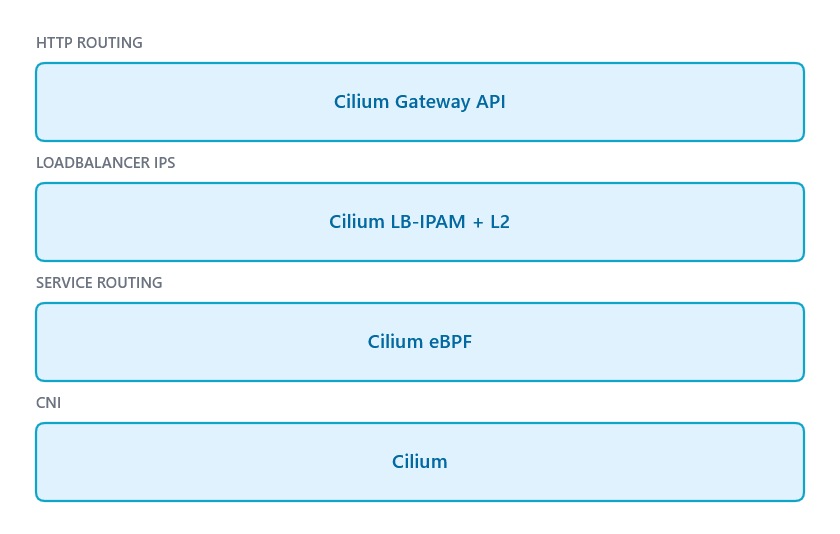
Three components replaced by one. In practice, this means:
- Fewer moving parts. No MetalLB leader election, no ingress-nginx Deployment to scale, no kube-proxy DaemonSet to keep in sync with iptables rules.
- One place to look when networking breaks. A single
cilium statusand the cilium-envoy logs cover everything. - Gateway API is more expressive. HTTPRoute rules are typed and validated. Header matching, redirects, rewrites, and traffic splitting are first-class fields, not annotation strings that a controller may or may not parse correctly.
- The migration is gradual. You can keep old Ingress objects running alongside new HTTPRoutes. There is no flag-day for the route migration itself — only the final cutover when you remove ingress-nginx requires a brief service interruption.
The rough edge today is Cilium's handling of multiple certificateRefs. If you hit the xDS deadlock, it is not obvious from kubectl output alone — you have to dig into cilium-envoy pod logs to find the NACK. The workaround (a single combined certificate) is clean, but it requires DNS01 challenge support, which means setting up a DNS provider integration in cert-manager if you haven't already.
Everything else — the Helm chart native HTTPRoute support, the redirect pattern, the cert-manager Gateway API integration — worked as documented. The overall migration of roughly 40 applications and Ingress resources took a couple of hours one evening when traffic was low, and left the cluster in a noticeably simpler state.